
FD777 Login: Sign In, Reset a Password, Fix Errors (2026)
Logging in to FD777 is a mobile number and a password. What sends people to a search engine is everything around that: the number format that quietly fails, the lock after four wrong attempts, the six-digit code nobody remembers setting, and the sinking feeling that comes with a balance you cannot reach. This page covers the login itself, the recovery routes, and the security habits that keep the account yours.
How the FD777 login works
Because the mobile number is the identity, everything hangs off it. Login, password reset, new-device verification and withdrawal confirmations all route to the same SIM. That is a reasonable design, and it has one obvious weak point: lose the number and you lose the easy path back in. Worth knowing on day one rather than on the day it matters.
Open FD777 and sign in (opens fd777.cc in a new tab, affiliate link)
Signing in to FD777, step by step
- Open FD777 in the app or a browser
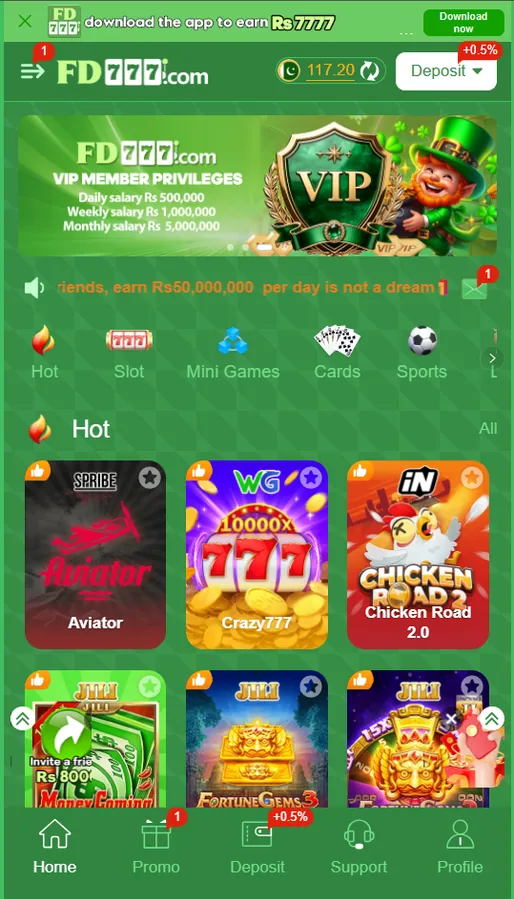
Launch the installed app, or open the platform in Chrome or Safari. Both land on the same account — there is no separate app-only login. If the app opens straight into the lobby as a guest, the Login option is behind the profile icon in the bottom navigation bar rather than on the first screen.
- Tap Login rather than Register
The two buttons sit next to each other and the Register one is usually the more prominent of the pair, which is how people end up creating a second account by accident. If the form is asking you for an invitation code, you are on the registration screen, not the login screen. Back out and switch.
- Enter the registered mobile number
Ten digits in 3XXXXXXXXX form, with no leading zero and no +92 typed in front, because the country code is already fixed in the field. This is the single most common cause of an account-does-not-exist message on an account that plainly exists.
- Enter your login password
This is the password you set at registration, not the six-digit withdrawal password. Tap the eye icon and check what you actually typed before you submit — mobile keyboards capitalise the first character by default, and a capitalised first letter is the reason for a large share of failed logins.
- Clear any verification prompt
On a new phone, a new browser or an unfamiliar network, the platform may ask for a code sent by SMS to the registered number. Enter it. That prompt is the system doing its job, and an account that never challenges a new device is an account with weaker protection, not better convenience.
- Check the wallet before you play
Once you are in, open the wallet and confirm the cash and bonus balances read as expected. If you use a laptop as well, the app carries a Switch to PC option that hands the session to the desktop layout, which is easier to read for anything involving the cashier.
If you have not created an account yet, this is the wrong page — the FD777 registration walkthrough covers the signup form and where the invite code goes. If the app itself will not open or install, the APK download and install guide deals with that separately.
Forgot your FD777 password? The recovery path
The reset itself is quick — under a minute when the SMS behaves. Choose a new password you have not used on another site, and do not set it to a variation of the old one you were already unsure about. If the code does not arrive, the same troubleshooting applies as at signup: wait the full timer before resending, check the promotional folder in your messaging app, and try again later if the gateway is congested.
Now the honest part. If you no longer have the SIM, this is hard. Every recovery route points at that number, so you are left with two options: get the number back from your mobile operator, which for Jazz, Zong, Telenor and Ufone means a CNIC-backed replacement SIM and is usually the faster path, or open a support ticket with the operator and try to establish ownership through deposit records, transaction IDs and the receiving accounts saved on the wallet. The second route can work, but it is slow and there is no guarantee at the end of it. Keep the registered number active — that is the whole lesson.
It is the obvious move and it makes things worse. Multiple accounts tied to one person are the most common trigger for a frozen balance, and the check runs at withdrawal time, after you have played. Work the recovery instead, however tedious it is.
FD777 login problems and what fixes each one
| Problem | Likely cause | Fix |
|---|---|---|
| Incorrect password | Keyboard auto-capitalisation, or the withdrawal password typed by mistake. | Tap the eye icon and read what you typed. If still wrong, reset by SMS. |
| Account locked / too many attempts | Repeated failed logins triggered a temporary lockout. | Stop trying for 30 to 60 minutes, then use password reset rather than guessing. |
| Account does not exist | Number entered as 03XXXXXXXXX or with +92 in a field that already has it. | Retype as ten digits beginning with 3. |
| Logged out every few minutes | Battery optimisation killing the app, or a browser clearing cookies on exit. | Exempt the app from battery optimisation; allow site data in the browser. |
| Blank screen after login | A failed asset load, common on an old build or a weak connection. | Clear the app cache, reopen on Wi-Fi, and update to the current build. |
| Stuck on the loading spinner | Corrupt local cache after an interrupted update. | Force close, clear cache, and reinstall if it persists. The account is unaffected. |
| Page will not load on your network | ISP or workplace DNS filtering the domain. | Switch from that Wi-Fi to mobile data. Reach for a VPN last, not first. |
FD777 login errors, causes and fixes
Agar login nahi ho raha aur password bilkul theek hai, check the number field first — it is almost always the leading zero. That took me longer to work out than I would like to admit, because the error text says the account does not exist rather than saying the number is malformed, and you spend ten minutes convinced the account has been deleted.
On VPNs specifically: people reach for one the moment a page fails to load, and it is the wrong instinct on an account that handles money. Logging in from Karachi on Monday and from a Netherlands exit node on Tuesday looks exactly like a compromised account from the platform's side. That is a review, and reviews land on pending withdrawals at the worst possible moment.
Sign in to FD777
Same mobile number and password in the app or in a browser. Registering is free if you do not have an account yet.
Open the FD777 login (opens fd777.cc in a new tab, affiliate link)
Affiliate link · 18+ only · Deposits are non-refundable once staked. Read our responsible gaming guide before you fund an account.
Logging in on a new phone or browser
You do not need to log out on the old phone first; the platform allows the account to be reachable from more than one device, though behaviour when two sessions are active at once is inconsistent and one may be dropped. If you have sold or handed on an old handset, log out of it deliberately and change the password afterwards. Clearing the app is not the same as ending the session.
Login password vs withdrawal password
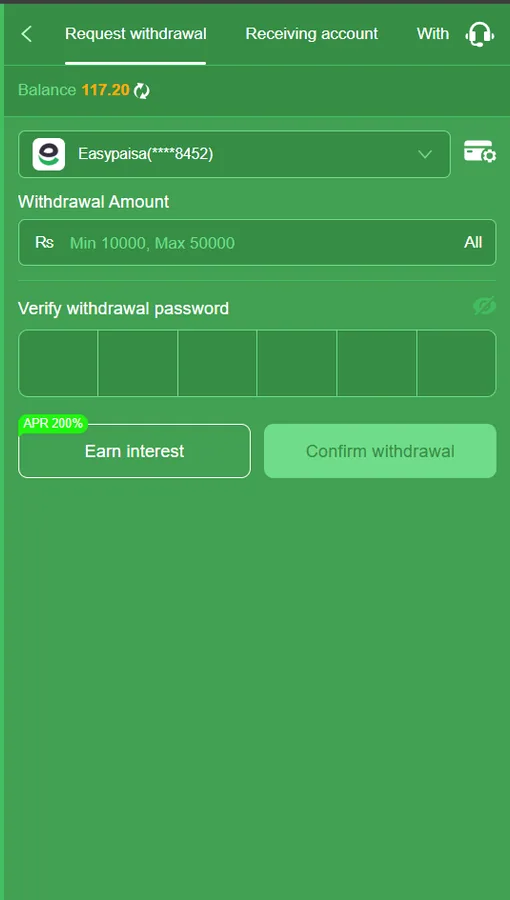
A lot of people arrive at this page having already hit the confusion. They can log in perfectly well, they are looking at their balance, and the cash-out button is asking for a code they have never consciously chosen. Set both deliberately — the login password at registration, the withdrawal password from the wallet screen before you deposit — and the problem disappears. The full payout flow, including the reasons requests get held, is on the FD777 withdrawal guide, and the nine reasons a withdrawal gets held goes through the exact error text each one produces.
Keeping your FD777 account secure
This is the part I would ask you to actually read, because the losses I see reported are almost never the platform's doing. They follow a script. Someone joins a WhatsApp group full of screenshots of large wins. An "agent" offers to top up your account at a discount, or to unlock a bonus, or to push a stuck withdrawal through a contact. They ask for the OTP that just arrived, or for the withdrawal password, or for a transfer to a personal Easypaisa number instead of the in-app cashier. Every one of those requests is the scam itself.
The practical list, short enough to remember:
- Never read out an OTP. The code is for you to type into the app, never for anyone to hear.
- Nobody legitimate ever asks for your withdrawal password. Support does not need it, and cannot use it.
- Deposit only through the in-app cashier. Transfers to a personal wallet number are gone the moment they send, whatever the "agent" promised. Our deposit guide shows what the legitimate flow looks like.
- Use a password that is not your Easypaisa or JazzCash PIN, and not one you have reused on another site.
- Keep the registered SIM active. It is the only recovery route and the only channel for withdrawal confirmations.
- If something looks wrong — a login alert you did not cause, a balance that moved, a saved receiving account you did not add — change the login password, then the withdrawal password, then remove any unfamiliar payout account, and open a support ticket with timestamps.
And if the platform itself is what you are unsure about rather than the security around it, our honest assessment of whether FD777 is real or fake sets out what we found running real money through it, including the parts that did not go well. The FD777 FAQ covers the shorter questions.
Chasing a locked account to get back to a balance is a signal worth paying attention to. 18+ only, and never stake money you cannot afford to lose. Our responsible gaming page lists helplines, including Urdu-language support, that actually answer.
No account yet?
The two-minute signup, the invite code field, and the SMS verification step worth doing on day one.
Withdrawal password and payouts
Rs 10,000 minimum, up to six saved accounts, and why requests get held for review.
App will not open?
Reinstalling from the official build, and the install errors that look like login errors.
Bonuses and VIP
What the mission credits and event bonuses are worth once the wagering is applied.
Frequently asked questions
How do I log in to FD777?
Open the app or the website, tap Login, enter your registered Pakistani mobile number as 3XXXXXXXXX with no leading zero, then your login password. Clear the SMS verification prompt if one appears on a new device. The same credentials work in the app and in any browser.
What do I do if I forgot my FD777 password?
Use Forgot Password on the login screen. Enter the registered mobile number, request the code, enter the six digits that arrive by SMS, then set a new password. The reset only works through the registered number, which is why keeping that SIM active matters more than it appears at signup.
Why does FD777 say my account does not exist?
Nine times out of ten the number was typed with a leading zero or with +92 in front of it, in a field that already supplies the country code. Retype it as ten digits starting with 3. If it still fails, the account may be registered on a different number than you remember.
My FD777 account is locked after too many attempts. How long?
Repeated wrong passwords trigger a temporary lock that usually clears itself within 30 to 60 minutes. Do not keep trying during the lock — each attempt can extend it. Use the password reset instead, which goes through SMS rather than through the password you have been guessing.
I lost the SIM the account was registered on. Can I still recover it?
It is genuinely difficult. Password reset, login verification and withdrawal confirmations all route through that number, so without it you are relying on operator support and whatever evidence of ownership you can produce. Reclaiming the number from your mobile operator is usually faster than arguing the case.
Why does FD777 keep logging me out?
Usually aggressive battery optimisation killing the app in the background, or a browser set to clear cookies on exit. Exempt the app from battery optimisation in Android settings, and allow site data for the platform in your browser. Switching networks mid-session can also invalidate a token and force a fresh login.
The app is stuck on the loading spinner. What now?
Force close it, clear the app cache from Settings then Apps then Storage, and reopen. If it still hangs, the local asset cache is corrupt — uninstall and reinstall from the official download. Reinstalling does not delete the account, which lives on the operator servers.
Should I use a VPN to log in to FD777?
We would not. A VPN changes your apparent country between sessions, and sudden geography changes are exactly the pattern anti-fraud systems flag, which can leave a withdrawal in manual review. If a network is blocking the platform, switching from that Wi-Fi to mobile data is the less disruptive fix.
Is the withdrawal password the same as the login password?
No. They are two separate credentials. The login password gets you into the account. The withdrawal password is a six-digit numeric code set from the wallet screen and required to confirm a payout. Resetting one does not reset the other.
Someone messaged me offering to top up my FD777 account. Is that real?
No. Self-appointed agents in WhatsApp and Telegram groups offering discounted top-ups, bonus unlocks or help with a stuck withdrawal are a consistent scam pattern. They will ask for your OTP, your withdrawal password, or a payment to a personal wallet. Deposit only through the in-app cashier.